
Weather
OneLouder AppsWeather
4.617.20K Reviews
- Version
- 0.7.6.2
- Installs
- 100.00M
- Age Rating
- Everyone
Screenshots
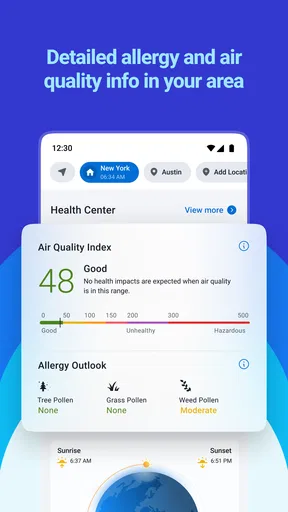
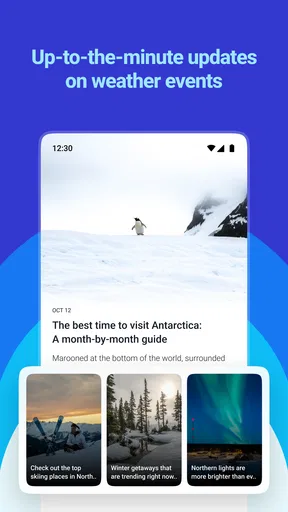
Our Review of Weather
 Analysis by Appyee
For me, a weather app earns its place on a phone when it helps turn a forecast into a sensible plan. Weather is built around local conditions, and its most useful idea is keeping the forecast close at hand so I can check what the day is likely to bring before choosing when to leave, what to wear, or whether an outdoor plan needs a backup.
A local forecast that helps with everyday decisions
The app is a weather app from OneLouder Apps, and its focus on a nearby forecast suits people who want a quick read rather than a deep dive into meteorology. I find that distinction important: a forecast is most useful when it relates to the place where I actually am, not just a broad regional outlook. The app’s local view is intended to make that check feel direct and practical.
In ordinary use, I would start with the current conditions, then look ahead to the hourly forecast if I need to decide about timing. A glance at the week view can help with bigger plans, but I treat it as a planning guide rather than a promise. Weather can change, so I check again close to an event instead of making a firm decision several days in advance.
How I would use the forecast through a busy day
Imagine I have a morning commute, an errand after work, and a walk planned in the evening. I would check the hourly forecast before leaving, then revisit it before the later outing. That small habit is more useful than opening a weather app once and assuming the morning conditions will hold all day. If rain appears likely around the time I expect to be outside, I can shift the walk, carry a light layer, or choose an indoor alternative.
The same approach works for parents coordinating school pickup, people who walk or cycle to work, and anyone whose plans depend on being outdoors. The practical value is not that an app can remove uncertainty; it is that a local forecast can help me notice when a plan deserves flexibility. I would use the radar view as another perspective when rain is a concern, while still checking the forecast and the sky rather than treating a map as a guarantee.
What it does well—and where I stay cautious
Its approachable layout makes routine checks feel uncomplicated. Current conditions offer a quick starting point, while hourly and weekly views answer different questions: what might happen later today, and what should I keep in mind over the coming days? The radar adds a visual way to follow weather patterns. Those views are most useful together, because no single screen answers every planning question.
I also appreciate the option to choose temperature units and adjust notification preferences. A useful tip is to be selective with alerts: keep the notices that would change what you do, and avoid turning every update into noise. Severe-weather warnings matter most when you might otherwise miss an important change, but ordinary forecast notifications can become easy to ignore if they arrive too often.
There are trade-offs. Forecasts are estimates, and a local reading may not reflect conditions a short distance away, especially when terrain or rapidly changing weather makes the area uneven. I would not rely on an app alone for a high-stakes decision such as whether conditions are safe for a long outdoor trip. For that, I would check relevant official warnings as well. The radar is helpful for context, but a moving weather map can look more precise than a forecast really is.
How it fits among weather apps
Compared with the default weather app on a phone, this one is worth considering if its local presentation and combination of hourly, weekly, radar, and alert views match the way you plan. A built-in app may be enough if all you want is the temperature and a quick glance at the day. On the other hand, someone who likes to inspect approaching rain visually may get more from a dedicated weather app like this. I would choose based on which view I actually use, not on the number of screens an app offers.
People who need specialist tools for professional forecasting, detailed outdoor navigation, or decisions where official emergency information is essential may be better served by more purpose-built resources alongside a general weather app. For casual planning, though, this kind of local overview can reduce the need to switch between several basic checks. It is especially convenient when I want to compare the current conditions with what may happen later, without turning a simple question into a research session.
Who is likely to get the most from it
The app is free to download and is rated for Everyone. It has a 4.7 average from around 199,000 ratings, with roughly 14,000 reviews and over 50 million installs. Those figures suggest broad interest, though they cannot tell me whether its forecast will suit every location or personal routine. The current version is 0.7.4.4, and it runs on Android 7.0 or later. In-app purchases range from $1.99 to $34.99 per item, so I would look at the purchase details in the app before paying for anything; the core reason to try it is the everyday forecast workflow.
I think it makes the most sense for someone who checks the weather before commuting, walking, running errands, or arranging casual outdoor plans. It is less compelling for a person who only wants a single temperature number, and it should not be the sole source for urgent safety decisions. If you install it, I would begin by setting the temperature units and choosing only the alerts you genuinely want. Then use the hourly view for today and the weekly view for tentative plans, checking again as those plans get closer.
Hey there! So, I recently downloaded this nifty app called Weather on my phone, and let me tell you, it’s been quite the game changer. Whether you’re someone who checks the weather religiously or just wants to avoid getting caught in the rain, this app has got you covered.
First Impressions
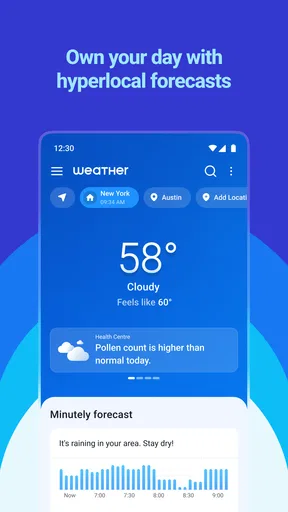
The first thing that caught my eye was the app’s sleek and intuitive design. The Weather app opens up with a beautiful display of your local forecast, complete with vibrant icons and easy-to-read text. It’s like having a mini meteorologist in your pocket, but way cooler. You can instantly see the current temperature, humidity levels, and even a little icon showing if it's sunny, cloudy, or pouring down.
Digging Into the Features
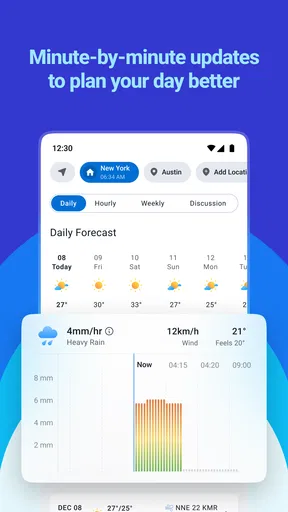
Now, let’s talk about features because this app is packed. One of my favorites has to be the hourly forecast. You get a detailed breakdown of what to expect throughout the day, hour by hour. This is super handy if you're planning to be out and about. No more guessing if you need to bring that jacket or if your sunglasses will suffice.
Another cool feature is the weekly forecast. It’s nice to get an overview of the week ahead, especially if you have events planned. You can quickly scan through to check if you’ll be needing an umbrella or if it’s safe to plan that beach trip.
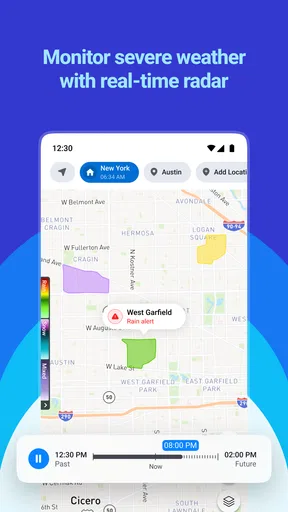
Oh, and did I mention the radar feature? It’s like watching a live map of weather patterns right on your phone. You can see where the rain is heading, and it’s pretty mesmerizing, not to mention useful if you’re trying to avoid a downpour.
Alerts and Notifications
The Weather app also has an alerts feature that has saved me more than once. You can set it to notify you about severe weather conditions, which is great if you live in an area prone to sudden storms or unexpected weather changes. The notifications are timely and give you a heads-up so you’re never caught off guard.
Customization and Settings
One thing I really appreciate is how customizable the app is. You can set your preferences for temperature units, choose which notifications you want, and even change the theme if you’re feeling a little adventurous. It’s these little things that make the app feel personalized and user-friendly.
Performance and Usability
In terms of performance, the app runs smoothly. I haven’t experienced any glitches or crashes, and the updates are quick and efficient. It’s also pretty light on battery usage, which is a definite plus. No one wants an app that drains their phone’s battery faster than a Snapchat session!
Using the app is straightforward. Even if you’re not tech-savvy, you’ll find it easy to navigate. Everything is laid out in a way that makes sense, and you can find what you need with just a few taps.
Final Thoughts
Overall, the Weather app is a fantastic tool for staying ahead of the elements. Whether you’re planning your day or just curious about the weather, this app delivers accurate and timely information. It’s become my go-to weather app, and I highly recommend giving it a try. Trust me, once you start using it, you’ll wonder how you ever managed without it.
So, if you’re on the lookout for a reliable and user-friendly weather app, definitely check out Weather. You can find it on both Android and iOS, and I promise, it’s worth the download!
Verdict
Strengths of Weather
- Accurate forecasts for multiple locations.
- User-friendly interface for quick access.
- Real-time weather updates and alerts.
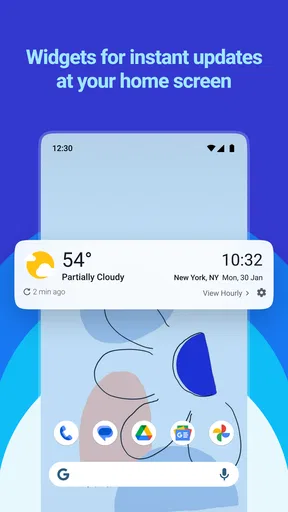
- Customizable widgets for your home screen.
- Detailed radar and weather maps included.
Limitations of Weather
- In-app ads can be distracting.
- Some features require a premium subscription.
- Occasional loading delays reported.
- Limited offline functionality.
- Battery consumption can be high.
Other Releases by OneLouder Apps
View All
1Weather Forecasts & Radar
Weather4.3
Similar Picks in This Category
View All
Weather - By Xiaomi
Xiaomi Inc.4.1

Weather & Radar Forecast
WetterOnline4.8

AccuWeather: Weather Radar
AccuWeather3.6

The Weather Channel - Radar
The Weather Channel4.6
1Weather Forecasts & Radar
OneLouder Apps4.3

Transparent clock and weather
MACHAPP Software Ltd4.2
You May Also Like
View All

Frequently Asked Questions
What features does the Weather app offer?
The Weather app provides real-time weather updates, detailed forecasts, radar maps, and severe weather alerts. Users can customize notifications for specific conditions, view hourly and weekly forecasts, and access historical data. The app also offers features like sunrise/sunset times, wind speed, and humidity levels, catering to both casual users and weather enthusiasts.
Is the Weather app free to use?
The Weather app is free to download and offers a range of basic features at no cost. However, for an enhanced experience, users can opt for a premium subscription. This typically includes ad-free usage, advanced radar features, and extended forecast data. Pricing and features may vary, so checking the app description is recommended.
How accurate is the Weather app?
The accuracy of the Weather app depends on its data sources and algorithms. Typically, it uses information from well-established meteorological services, providing reliable forecasts. Users generally find the app accurate for short-term forecasts, while long-term predictions may vary. It's advisable to compare with other sources for critical planning.
Does the Weather app require an internet connection?
Yes, the Weather app requires an internet connection to update its data and provide real-time weather information. While some apps may offer offline access to previously downloaded data, an active connection is essential for the most current information. This ensures users receive accurate forecasts and timely alerts.
Can I customize the Weather app notifications?
Yes, the Weather app allows users to customize notifications to suit their preferences. You can set alerts for specific weather conditions, such as rain, snow, or severe weather warnings. Additionally, users can choose the frequency of updates and notifications for daily forecasts, ensuring they receive only the most relevant information.
